Home → For Libraries → Statistics → Annual Report Survey
Maine Public Libraries Annual Report
Starting Your Annual Report
- Locate and test your username and password to login into LibPAS [https://me.countingopinions.com]. Logins and passwords are the same as last year. If you can't find your login, you can request it on the LibPAS login screen or contact Jenny Melvin, State Data Coordinator 207- 650-0190.
- Print a copy of the annual report instructions and definitions.
- Print a copy of the 2024 annual report work form.
- Login to LibPAS and print a copy of last year's survey.
After logging in, choose Print on right side of the top navigation bar.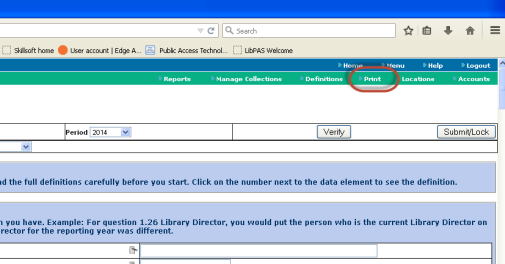
This will allow you to print a working copy with last year's data. This is very helpful to see what data to gather before you actually start entering information. - Compile your library's statistics for input. When finished, submit.
- For help, contact Jenny Melvin, State Data Coordinator
207-650-0190.
Reminder
- Many fields in the survey have been prefilled for you. Please take the time to check that the information is still current. If you need to make a change, click inside the field and type in the new data.
- After submitting your survey in LibPAS, you will be able to log back in and review or print your survey but you will not be able to make changes to your report. If you do need to make changes to the data entered, you will need to contact Jenny Melvin.
Resources
- Be prepared for the annual report; keep statistics all year. Try using one of the sample worksheets.
- Calculators from Colorado’s Library Research Service:
- Wage Calculator: This wage calculator allows you to enter an hourly, weekly, monthly, or annual salary, and see what that translates into for the other time periods.
- Random Date Generator: This random date generator allows users to generate a number of random dates for any calendar year, allowing for limiters such as the ability to exclude specific days of the week and allowing a maximum number of dates per month




